Medical and surgical logbook
- 2.3
- Rating
- 10.00K
- Installs
- Free
- Price

 Analysis by App-foxy
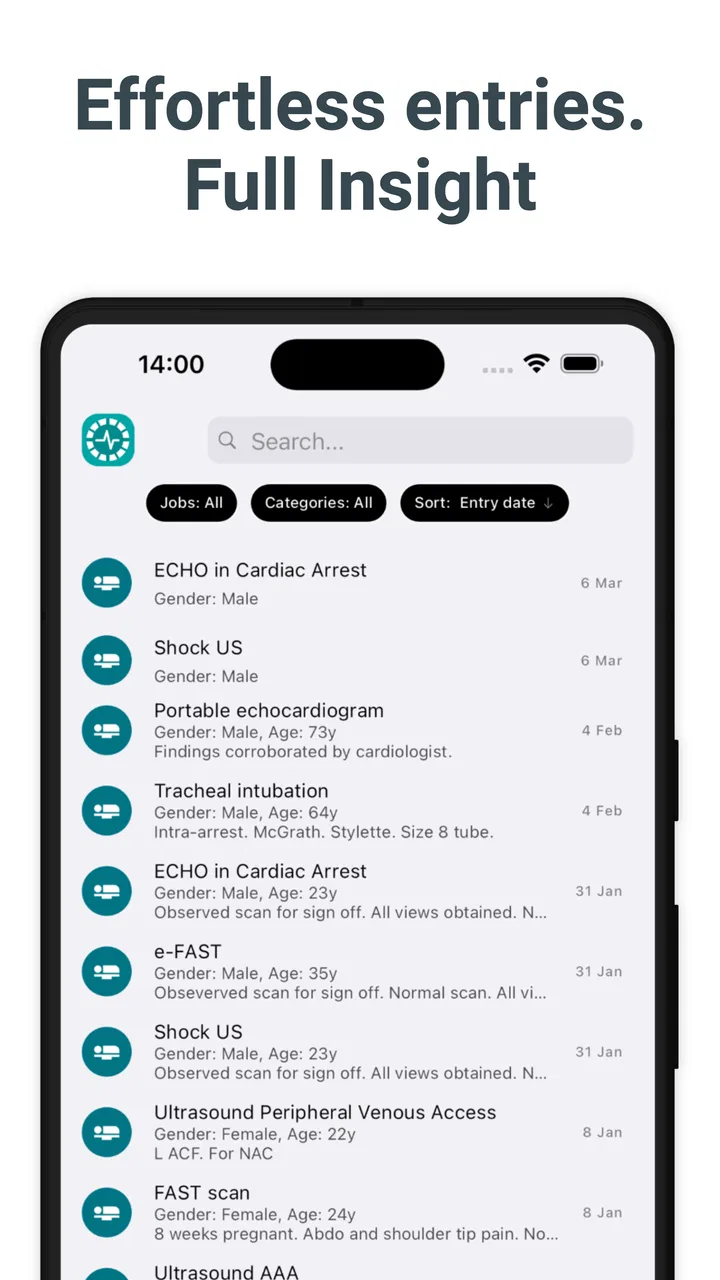
Keeping a reliable record of clinical work sounds simple until the details begin to pile up. Procedures, outpatient visits, admissions, clinics, and academic activity can quickly become scattered across notebooks, spreadsheets, messages, and memory. Medical and surgical logbook is built for that particular problem: it is a medical logbook app from Logitbox Ltd that brings those records into one place. I found its purpose easy to understand, but the experience is more practical than polished, so it suits users who value a focused record-keeping tool more than a broad clinical platform.
The app is free to install and is rated for Everyone, which makes it approachable for students, trainees, and working clinicians. It has passed the ten-thousand-install mark, although its average rating sits at 2.3 from roughly seventy-five ratings and a small handful of written reviews. I would not treat that score as a complete verdict, but I would take it as a reason to begin with a modest, low-risk trial rather than immediately making the app the only home for important records.
Where the real friction begins
The first challenge is not understanding the idea; it is deciding how much information to enter and how consistently to enter it. A logbook becomes useful when entries follow a repeatable pattern. If one procedure is recorded with a detailed note, another only with a short label, and a third is left until the end of the week, later summaries become less dependable. The app can provide a central place for your activity, but it cannot make incomplete habits complete.
You May Also Like

 Blood Strike: 2.5 Anniversary
Blood Strike’s Loadouts Turn Every Drop Into a Tactical Gamble
A close look at Blood Strike’s custom loadouts: how fast access to signature weapons reshapes its battle royale rhythm, rewards preparation, and narrows the gap between fights.

 Pandora - Music & Podcasts
Pandora’s Music Is Easy to Start, but Harder to Recover
Pandora’s strength is its low-effort path from a seed to a station. Its weak spot is how much confidence it asks you to place in connection, setup, and quiet recovery.

 8 Ball Pool
 Is Built on Rivalries, Rematches, and Routine
A close look at the rivalries, rematches, shared routines, and unanswered safety questions that turn a quick pool match into a persistent mobile community.

 Samsung Music
’s Quiet Strength Is Playing What You Already Own
Its reach comes less from spectacle than from dependable access to a personal library. That simplicity is both the app’s strongest retention engine and its ceiling.

 AccuWeather: Weather Radar
AccuWeather Review: A Quick, Clear Forecast for Everyday Decisions
For everyday plans, the best forecast is the one you can understand quickly. AccuWeather makes rain timing, radar, and local conditions easy to act on, with a few trade-offs.

 Hill Climb Racing
Why Hill Climb Racing Still Turns Crashes Into One More Run
A tiny car, a bumpy hill and one more upgrade: Hill Climb Racing keeps resurfacing because its simple chaos makes every near-miss feel personal.
More From Our News Desk
View All News


I would begin by treating the app as a structured diary rather than as a replacement for a hospital record system. Its role is to help you document your own professional or educational activity. That distinction matters. A personal logbook should not become a place for unnecessary patient-identifying information, and it should never be used as the sole source for urgent clinical decisions. A good entry should help you remember what you did, where it belongs in your training, and what follow-up is needed without turning the app into a full patient chart.
Users may also get stuck when they expect the first screen to explain the best workflow. A medical logbook has several possible uses: recording procedures, tracking clinic attendance, noting outpatient work, documenting admissions, or collecting academic activity. Those uses overlap, but they are not identical. A surgeon in training may think in terms of operative exposure and level of involvement, while a student may care more about cases observed, clinics attended, and learning points. The most useful setup is therefore the one that reflects your own reporting requirements.
My practical advice is to choose one narrow starting point. For example, record only procedures for the first few days. Once you know how quickly you can create a useful entry, add clinics or academic work. This avoids the common mistake of designing a perfect taxonomy before recording anything. The best logbook is the one you can update immediately after work, not the one with the most elaborate categories.
What to check before committing to it
Before relying on the app, I would confirm that it runs comfortably on your phone and that the current release is compatible with your device. The listed minimum operating system is Android 9, and the current version is identified as 202607291. Those details are worth checking before you spend time building a history, particularly if you use an older handset or a managed work device.
I would also test the complete journey rather than merely opening the app. Create a harmless sample entry, close the app, reopen it, and see whether the record is still easy to find. Try correcting a typo and removing the test item if that option is available in your workflow. This small exercise answers more useful questions than a quick glance at the store page: can you enter information quickly, can you recognize old entries, and does editing feel safe enough for routine use?
Do the same with your intended naming style. Decide whether you will use full procedure names, accepted abbreviations, or a combination. Consistency is especially important when you later count or review cases manually. “Appendectomy,” “appendix case,” and an abbreviation may all be clear to you at the time, but they can become three separate-looking labels when you are preparing a training summary.
Privacy deserves a deliberate check before any real use. I would avoid names, hospital numbers, addresses, photographs, or other unnecessary identifiers. Use a case reference that makes sense only within your approved professional system, and follow your employer or training program’s rules. A medical logbook is convenient precisely because it travels with you, so convenience should not lead to casual handling of sensitive information.
The app is free, but in-app purchases are listed from $5.49 to $47.99 per item. That makes it important to understand what you can accomplish without paying before building your entire routine around it. I would use the free experience for a representative period, including the kinds of entries you expect during a busy week, and only then decide whether any paid option is worthwhile. The right question is not whether an upgrade exists; it is whether it removes a specific obstacle in your own workflow.
A setup routine that prevents messy records
I recommend creating a short personal entry template outside the app before you begin. Keep it to the essentials: date, setting, activity, your role, and a brief learning or follow-up note. If the app presents different fields, map your template to those fields instead of inventing a new format every time. This gives you a stable fallback when you are tired or moving between wards, theatres, clinics, and teaching sessions.
For procedures, your role is often more valuable than a bare procedure name. Observed, assisted, performed under supervision, and performed independently can mean very different things in a training review. If the app allows a suitable place for that distinction, use it consistently. If it does not, keep the distinction in a concise note rather than assuming that the procedure label alone will explain your involvement.
For outpatient and clinic work, avoid writing entries that are too vague to help later. “Clinic” may be enough for a daily attendance record, but it will not remind you what specialty or learning objective mattered. A short, non-identifying description such as the clinic type and the main educational focus can make the record much more useful without turning it into patient documentation.
Admissions need a similar balance. A logbook entry should capture your participation and learning, not reproduce the admission record. I would note the clinical setting and your role, then add a general learning point. This keeps the app aligned with its purpose and reduces the temptation to copy sensitive details simply because there is space to write them.
Academic activity is easy to forget because it may not feel like a clinical case. Record teaching sessions, presentations, audits, or study-related work when it happens, using a clear label that separates it from patient-facing activity. That separation becomes valuable when you later need to demonstrate a broader training portfolio rather than only a count of procedures.
Recovering when the workflow breaks
Everyday use is where I would judge this app most carefully. Imagine finishing a long theatre list, moving straight to a clinic, and remembering several hours later that two cases were never logged. The safest recovery is not to guess. Add the missed entries while the sequence is still fresh, mark the approximate context in your note if appropriate, and avoid inventing details that you cannot confidently recall. A concise accurate record is better than a detailed but uncertain one.
If you are unsure whether an entry was saved, first look for it before creating a duplicate. Search or browse using the date, activity name, or setting you normally use. Duplicate records are particularly troublesome in a logbook because they can make your exposure look larger than it was. When the interface does not make the saved state obvious, pause after submitting and verify that the item appears in the history before moving on.
When a correction is needed, change the original entry rather than adding a second version that says “corrected.” Two competing records create confusion later, especially when you are preparing evidence for a supervisor. If editing is awkward, keep a brief private note about the correction and resolve it at the next calm opportunity, but do not repeatedly add replacement entries as a workaround.
A useful habit is a weekly review. I would compare the app with a neutral calendar or rota, not with confidential patient records. Look for missing shifts, repeated cases, and inconsistent labels. This is one of the less obvious benefits of a logbook routine: the review can reveal gaps in your exposure and learning, not just errors in data entry. You may notice that you have recorded many procedures but very few reflections, or many clinics without capturing the specialty that matters to your training.
For a busy user, the strongest workflow may be “capture now, refine later.” Enter the minimum accurate information immediately, then add a learning note during a quieter period. This two-stage method is more realistic than expecting yourself to write a polished reflection beside a theatre or ward. The trade-off is that unfinished entries can accumulate, so I would set a regular time to complete them rather than letting the second stage disappear.
When the problem is probably outside the app
Not every failed entry points to a software defect. A phone with very little free space, an unstable connection, an outdated operating system, or aggressive battery management can interfere with many apps. If the app behaves strangely, restart the phone, check that the device meets the Android 9 minimum, and try again when the connection is stable. These are basic steps, but they separate a local device problem from a repeatable issue inside the app.
It is also worth checking your own process before blaming the interface. If entries are hard to find, the cause may be inconsistent terminology. If your log feels incomplete, the cause may be delayed recording. If a summary seems wrong, duplicated or differently named entries may be responsible. A short test using three deliberately consistent sample records can help identify whether the difficulty is technical or simply a workflow that needs tightening.
Managed phones create another possible complication. Workplace security settings may restrict installation, storage, notifications, or access to certain services. In that situation, changing the app may not solve the problem. Use an approved personal or work device according to local policy, and do not bypass security controls to make a logbook more convenient.
I would be cautious about deleting and reinstalling as a first response. Reinstallation can remove local information in some apps, and a logbook is precisely the kind of tool where losing a history is more damaging than losing a casual note. Before taking that step, preserve any information you are allowed to retain using an approved method and make sure you understand how your records are stored and restored.
The same caution applies to changing phones. A medical logbook should not be treated like a disposable checklist. Before migration, test the new device with a small sample and verify that older records remain available in the way you expect. If your training program requires an official logbook export or supervisor sign-off, keep that formal process separate from your personal app routine.
Who benefits most from this focused approach
I see the clearest fit for students, junior doctors, residents, fellows, and other clinicians who need a personal record of activity across several settings. It can be especially useful when your work is fragmented between procedures, clinics, admissions, and academic sessions. Instead of keeping one notebook for theatre and another spreadsheet for teaching, you can aim for one consistent capture habit.
It may also help someone preparing for a supervision meeting. A weekly review can turn vague memories into concrete discussion points: which procedures you encountered, where you assisted, what you want more exposure to, and which academic activities you completed. The app does not replace a supervisor’s assessment, but a clearer record can make that conversation more productive.
On the other hand, I would skip it as a primary tool if you need a full electronic health record, team collaboration, prescribing, scheduling, or detailed patient management. A personal logbook and a clinical information system solve different problems. I would also hesitate if your institution already mandates a specific platform with controlled reporting, because duplicating every entry may create more work than value.
It is less suitable for someone who wants sophisticated analytics without manual discipline. Recording activity is one task; producing meaningful trends is another. If your main goal is automated dashboards, verified competency mapping, or complex portfolio management, a dedicated training platform may be a better match. Medical and surgical logbook makes more sense when the priority is straightforward capture and later review.
How it compares with notebooks and spreadsheets
A paper notebook still has one major advantage: it is immediate, flexible, and independent of a phone. During a hectic day, writing a short reminder may be faster than unlocking a device. A notebook is also easy to customize. Its weakness appears later, when you need to locate a particular procedure, separate clinic work from academic work, or turn months of notes into a coherent summary.
A spreadsheet offers stronger control over columns, sorting, and personal reporting. It can be a better choice for users who already have a well-designed template and need detailed calculations. However, spreadsheets often encourage overbuilding. A complicated sheet may be excellent in theory and abandoned in practice, especially on a phone. The app’s appeal is the possibility of a more focused mobile routine, provided its available structure matches your needs.
A general notes app is the quickest alternative for free-form reflections, but it tends to blur categories. A clinical note, a procedure count, and a teaching reflection may all become paragraphs in one long stream. This dedicated logbook concept is more useful when you want activity records to remain distinct and reviewable.
The trade-off is flexibility. Paper and spreadsheets let you design almost anything, while a focused app asks you to work within its own flow. That is helpful when the flow fits your training requirements and frustrating when it does not. I would compare the app against one week of your current method, not against an imaginary perfect system. If it reduces missed entries without forcing awkward compromises, it has earned a place in your routine.
My practical verdict after weighing the trade-offs
Medical and surgical logbook is a sensible idea delivered as a focused medical record-keeping app rather than an all-purpose clinical companion. I like the breadth of its intended use: procedures, clinics, outpatient work, admissions, and academic activity can all belong in the same personal logbook. That makes it more relevant than a simple procedure counter for users whose training week changes from day to day.
Still, I would approach it carefully. The 2.3 average from around seventy-five ratings suggests that the experience has not worked smoothly for everyone, even though the app has more than ten thousand installs. Those figures do not tell me exactly why users were dissatisfied, so I would not assume the app is unreliable; I would simply test the complete workflow before trusting it with a long history.
Start with non-sensitive sample entries, confirm that the app fits your device, establish consistent labels, and review the records after several busy days. If the process feels quick enough to maintain and the records remain easy to understand, it can become a useful companion for personal training documentation. If you repeatedly struggle to save, locate, edit, or organize entries, a simple spreadsheet or an institution-approved portfolio may be the better choice.
The free entry point makes that trial practical, while the listed in-app purchases mean you should evaluate paid options only against a clearly identified need. I would not pay merely because a larger logbook feels reassuring. I would pay only if the relevant option genuinely supports the way I record work and does not introduce a new dependency that your training program cannot accept.
Overall, I would recommend it to a user who wants a dedicated place to capture professional activity and is willing to build a disciplined routine around it. I would not recommend treating it as a patient record, an official institutional system, or a substitute for careful backup and privacy practice. Used within those boundaries, Medical and surgical logbook can turn scattered recollections into a more usable personal history. Its success depends less on entering everything and more on entering the right information promptly, consistently, and safely.
FAQs for Medical and surgical logbook
01What is Medical and Surgical Logbook used for?
Medical and Surgical Logbook is designed to help medical students, interns, residents, and healthcare professionals record and organize clinical experiences. Users can document procedures, diagnoses, operations, patient encounters, reflections, and supervisor assessments in one place. It can be useful for tracking training progress, preparing reports, and maintaining a clearer overview of completed medical and surgical activities.
02Can I use Medical and Surgical Logbook to store confidential patient information?
The app may allow you to enter details about clinical cases, but you should avoid recording personally identifiable patient information unless your institution has explicitly approved it and the app provides appropriate security controls. Use anonymized references instead of names, addresses, hospital numbers, or other sensitive data. Always follow local privacy laws, hospital policies, and professional confidentiality requirements before entering any information.
03Is Medical and Surgical Logbook suitable for medical students and surgical trainees?
Yes, the app is generally relevant to learners at different stages of medical education, including students, interns, residents, and surgical trainees. Its value depends on how your school, hospital, or training program manages clinical documentation. Before relying on it for official assessments, check whether supervisors accept app-based records and whether the available categories match your curriculum, competency framework, or required surgical logbook format.
04Does Medical and Surgical Logbook replace official hospital or training documentation?
No. The app should be treated as a personal organizational and tracking tool rather than a replacement for official patient records, operative notes, electronic health records, or institutional assessment systems. Clinical documentation must still be completed through the approved channels of your hospital or university. You should also confirm whether exported entries, signatures, and supervisor validations are officially recognized by your training program.
05What should I check before downloading Medical and Surgical Logbook?
Before downloading, review the app’s privacy policy, data-storage method, backup options, export features, account requirements, and compatibility with your Android or iOS device. It is also worth checking whether the app works offline, supports supervisor verification, offers customizable procedure lists, and receives regular updates. These details are particularly important because clinical records may be sensitive and difficult to recreate if they are lost.
Pros
- Keeps clinical cases organized in one searchable location.
- Supports quick access to records during rotations or on call.
- Helps track procedures and experience over time.
- Useful for preparing evidence during training reviews.
- Can encourage more consistent documentation habits.
Cons
- Data entry may become time-consuming after busy clinical shifts.
- Some features may require a subscription or in-app purchase.
- Cloud storage can raise privacy concerns for sensitive medical notes.
- Limited customization may not suit every specialty’s workflow.
- A lost device or account issue could make records temporarily inaccessible.

Medical and surgical logbook
Gallery